Showing posts with label SQL Utility. Show all posts

Sunday, May 10, 2009

Conditional Page break in SSRS

Conditional page breaks in SSRS are always something developer needs to work on in order to get it done. This is especially true when you need to render the same report in PDF.

Recently I need to implement the same and did that with a quick trick. Here is the sample SELECT I am using to demonstrate the same.


select 'Record 1' as record, 0 as PageBreak, 1 as grp
UNION ALL
select 'Record 2' as record, 0 as PageBreak, 1 as grp
UNION ALL
select 'Record 3' as record, 0 as PageBreak, 1 as grp
UNION ALL
select 'Record 4' as record, 1 as PageBreak, 2 as grp
UNION ALL
select 'Record 5' as record, 0 as PageBreak, 3 as grp
UNION ALL
select 'Record 6' as record, 0 as PageBreak, 3 as grp
UNION ALL
select 'Record 7' as record, 1 as PageBreak, 4 as grp
UNION ALL
select 'Record 8' as record, 0 as PageBreak, 5 as grp


"Record" column is just to show unique records. The most important column here is "PageBreak", which is setting the conditional page break with "1". That means whenever there is "1" in "pagebreak" column you need a page break otherwise keep on displaying the records on same page.

The other very important column is "grp". Well, you really don't need this column and still will be able to implement conditional page break functionality. But then SSRS will club all the records which requires page break into 1 grouping set, probably in the end with this sample data. So, in order to maintain the sequence of records we need to add a grouping column which will create a new group whenever it finds a different value in "pagebreak" column.

Now, lets move on to SSRS report. These steps will work in SSRS 2008. I am not adding standard steps of creating a data source and data set. I know you are all smart guys...

Simple enough, please follow these steps.

  1. Add a table with 2 columns, record and pagebreak.
  2. Now run the report and you will see all the records are coming in same page.
  3. Next, add a parent group to this row, parent to "Details" group in "Row Groups". Please check "Image 1".
  4. In the group expression select the "grp" column and the sorting, select "grp" in Sort by. Please check "Image 2".
  5. MOST Important, select "Between each instance of a group" of the newly create group under "Page Break" tab. Please check "Image 3".

Yep, that's it, run the report now. And you will see 3 records on page 1, 1 record on page 2, 2 records on page 3 and 1 record on page 4 and page 5.


image

Image 1


image

Image 2


image

Image 3

There are also other ways of doing the same, but I find this one very easy to implement.

Don't forget to hide new group by just minimizing the width and you are good to go. Try to render the same in PDF, and it works like a charm....


- Mohit Nayyar

Saturday, September 27, 2008

Data extrapolation on the fly

In some cases we need to generate the data based on a starting date, to an end data (today-getdate()).

This process is called data extrapolation based on limited information (starting date). Here I am trying to achieve the same without storing data in temp./staging tables.

First I am creating a temp. table wih 2 rows and now I need to generate rest of the rows starting from given date to today's date.

Next step is to make use of CTE to generate sequence of rows and finally making use of CROSS JOIN to join the sequence with real data and get the desired output.


CREATE TABLE #TEMP (
MYNAME VARCHAR(10),
STARTDATE DATETIME)
GO

INSERT INTO #TEMP VALUES ('Mohit', '2008-09-15')
INSERT INTO #TEMP VALUES ('Nayyar', '2008-09-22')
GO

WITH FIRST2(SEQ)
AS (SELECT 1
UNION ALL
SELECT 1),

FIRST4(SEQ)
AS (SELECT 1
FROM FIRST2 X
CROSS JOIN FIRST2 Y),

FIRST16(SEQ)
AS (SELECT 1
FROM FIRST4 X
CROSS JOIN FIRST4 Y),

FIRST256(SEQ)
AS (SELECT 1
FROM FIRST16 X
CROSS JOIN FIRST16 Y),

FIRST65536(SEQ)
AS (SELECT 1
FROM FIRST256 X
CROSS JOIN FIRST256 Y),

SEQROWS
AS (SELECT ROW_NUMBER()
OVER(ORDER BY SEQ) AS SEQNUMBER
FROM FIRST65536 WITH (NOEXPAND))

SELECT MYNAME,
STARTDATE,
DATEADD(DAY,N.SEQNUMBER - 1,STARTDATE) AS EXTRAPOLATION
FROM #TEMP
CROSS JOIN SEQROWS N
WHERE N.SEQNUMBER <= DATEDIFF(DAY,STARTDATE,GETDATE())
ORDER BY MYNAME,
STARTDATE,
3
GO

DROP TABLE #TEMP
GO


Thanks
Mohit Nayyar

Thursday, May 29, 2008

SSIS approach to handle Inferred Members

While loading data in Fact tables we usually see a scenario where the fact data is available but there is no corresponding business key in the related dimension.

In this case we choose multiple options to resolve the issue.
  1. Ignore that fact

  2. Insert the associated business key in dimension table and return the newly generated surrogate key from dimension table. And now store the data in Fact table with the surrogate key.

The second approach relates to a term called “Inferred members”. All the other attributes of that dimension will also get updated in next run of dimension load (usually nightly load).

In SSIS there are multiple options available to implement the second case.

First approach is to do lookup on the dimension table and for all the rows that are now matching, insert the business key in Dimension table and then do the lookup again to get the surrogate key.

Second approach is to make use of Lookup and Script component. Lookup component will ignore rows with no matching business key in dimension table. Then script component will process only those rows where it didn’t find the associated surrogate key and finally insert the same in dimension table and return the associated surrogate key through stored procedure output parameter.
This script component approach is more efficient because its using the existing lookup component only once and then doing all the processing in script component.

But the additional benefit comes if we make use of .Net Generic.SortedDictionary class to store the cache information regarding the newly generated key. Read more about this here…
http://msdn.microsoft.com/en-us/library/f7fta44c(VS.80).aspx


- Mohit

Friday, September 14, 2007

SQL Query tool that generates HTML / PDF / Word / Excel output

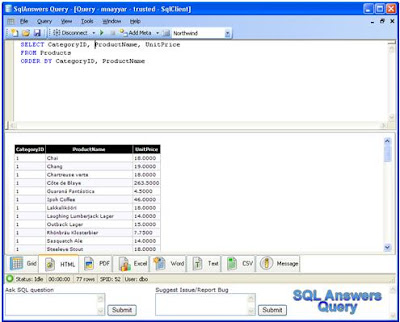
I just saw this new query tool from SQL Answers.

The beauty of this tool is to directly generate the output of any query into PDF / HTML / Excel / Word / CSV format. Please take a look here…....

http://www.sqlanswers.com/Software/SAQ/Default.aspx


Mohit Nayyar SQL Query Tool

This seems to be a lightweight tool to query multiple databases platforms like Microsoft SQL Server, Oracle, DB2, Microsoft Access and MySQL, but I just tested this for Microsoft SQL Server 2005 and I am really happy with this.

This makes things really easy when you need to send the output in PDF or HTML without any extra effort.

On the similar lines Microsoft also offers a “SQL Server Web Data Administrator” tool, which is very useful because of its basic web interface. You can find this here…….

http://www.microsoft.com/Downloads/details.aspx?familyid=C039A798-C57A-419E-ACBC-2A332CB7F959&displaylang=en

- Mohit Nayyar

Thursday, September 13, 2007

DTS to SSIS migration

Today I saw a new product coming soon to do DTS to SSIS migration called DtsXchange.

Looks promising and this is also capable to do something extra which built-in DTS migration doesn’t do like Dynamic Properties. Have a look here http://www.pragmaticworks.com/dtsxchange.htm


Users can also migrate existing DTS packages into SSIS using the FREE migration wizard provided by SQL Server 2005 but this wizard doesn’t cover complete DTS package. So in some cases manual effort is required, and SSIS doesn’t support some of the DTS features, so the user has to manually implement the functionality in new SSIS package.

You can find some known issues in migration here http://technet.microsoft.com/en-us/library/ms143462.aspx


But on top of this SSIS allows you to run the existing DTS package even without any change, using a wrapper called “Execute DTS 2000 Package Task” in the new SSIS package.

So if you don’t have the bandwidth to migrate the existing package then keep on running the old DTS packages in SSIS and start making new packages in SSIS.

Obviously you will miss the “All NEW SSIS” but it’s an easy work around. But I think you will miss a lot, because SSIS is NOT a new name of DTS but it's a truly enterprise level ETL tool. So its always better to migrate to SSIS as soon as possible.


- Mohit Nayyar

Wednesday, August 29, 2007

Get all user defined table information with RowCount and Size (space used)

"sp_spaceused" procedure is really handy to get the updated information about space usage by database or tables.


I combined the same with another very useful procedure "sp_MSforeachtable" to get this information for all user-defined tables.


If you see any problem with the information then just change the last parameter and set it to TRUE (FALSE in the script). That will update the space usage and then report the updated details.


CREATE TABLE #temp

(

TableName                    NVARCHAR (128),

RowsCnt                       VARCHAR (11),

ReservedSpace             VARCHAR(18),

DataSpace                    VARCHAR(18),

CombinedIndexSpace   VARCHAR(18),

UnusedSpace               VARCHAR(18)

)


EXEC sp_MSforeachtable 'INSERT INTO #temp (TableName, RowsCnt, ReservedSpace, DataSpace, CombinedIndexSpace, UnusedSpace) EXEC sp_spaceused ''?'', FALSE'


SELECT TableName, RowsCnt, ReservedSpace, DataSpace, CombinedIndexSpace, UnusedSpace

FROM #temp

ORDER BY TableName


DROP TABLE #temp


- Mohit Nayyar


Thursday, August 16, 2007

Table row count using 3 different ways

Recently one of my Friend was looking for a script to get row count in all user table, so we come up with 3 different ways of doing the same thing......I hope this will help

SELECT object_name (i.id) TableName, rows as RowCnt
FROM sysindexes i INNER JOIN sysObjects o ON (o.id = i.id AND o.xType = 'U')
WHERE indid < 2
ORDER BY TableName

************************************************************

CREATE TABLE #temp (TableName VARCHAR (255), RowCnt INT)
EXEC sp_MSforeachtable 'INSERT INTO #temp SELECT ''?'', COUNT(*) FROM ?'
SELECT TableName, RowCnt FROM #temp ORDER BY TableName
DROP TABLE #temp

************************************************************

SET NOCOUNT ON
DECLARE @tableName VARCHAR (255), @sql VARCHAR (300)
CREATE TABLE #temp (TableName VARCHAR (255), rowCnt INT)
DECLARE myCursor CURSOR FAST_FORWARD READ_ONLY FOR
SELECT TABLE_NAME FROM INFORMATION_SCHEMA.TABLES WHERE TABLE_TYPE = 'base table'
OPEN myCursor
FETCH NEXT FROM myCursor INTO @tableName
WHILE @@FETCH_STATUS = 0
BEGIN
EXEC ('INSERT INTO #temp (TableName, rowCnt) SELECT ''' + @tableName + ''' as tableName, count(*) as rowCnt from ' + @tableName)
FETCH NEXT FROM myCursor INTO @tableName
END
SELECT TableName, RowCnt FROM #temp ORDER BY TableName
CLOSE myCursor
DEALLOCATE myCursor
DROP TABLE #temp


- Mohit Nayyar